
How to Create a Content Calendar for Video Creators (8 Steps)
A video content calendar is a production system, not a list of publish dates. Here are the 8 steps, the fields to track and the weekly review that makes it improve.
On this page
To create a content calendar for video creators, set a 90-day goal, choose 3 to 5 content pillars, turn them into recurring series and pick a cadence you can sustain. Then track every video through its production stages, not just its publish date, and review the results every week.
Most calendars leave out the column that matters more than the date: format. In Revid's analysis of 176,367 TikToks with 1,000+ likes posted between October 2025 and October 2026, the median challenge video drew 182K views, against 62K for the median tutorial (method and charts in what makes a TikTok go viral). You set that gap when you fill in the format field, long before you choose a posting day.
The 8 steps at a glance
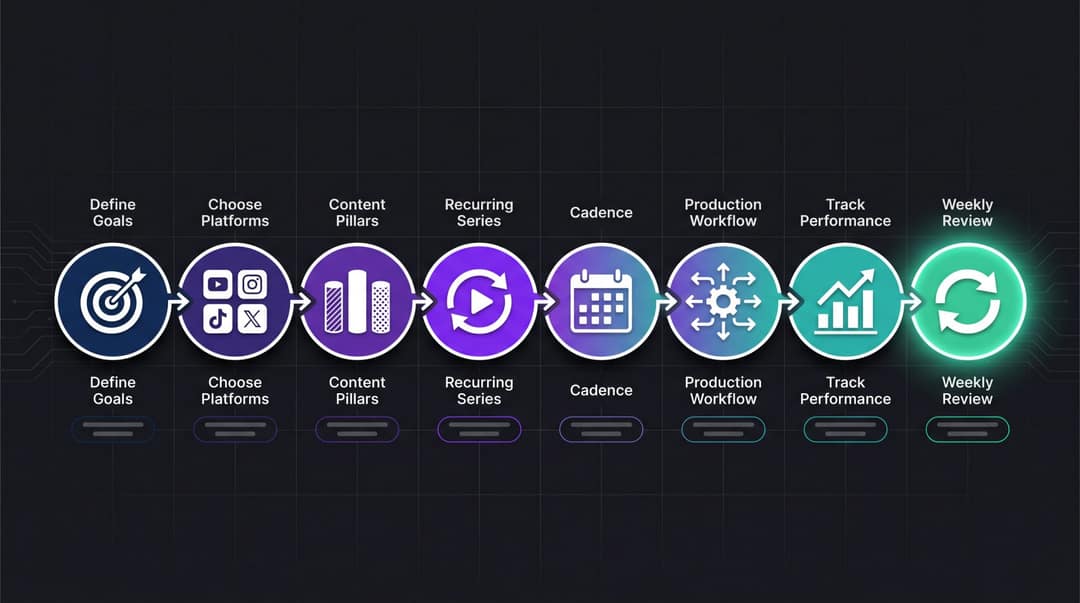
- Define the goal. Write one 90-day goal: reach, trust, leads, sales, community, monetization or repurposing.
- Choose platforms. Decide where each idea belongs and what each platform version needs.
- Build 3 to 5 content pillars so you never start from a blank page.
- Turn pillars into recurring series instead of one-off ideas.
- Set a cadence you can hold for at least 90 days.
- Add a production workflow: idea, script, record or generate, edit, approve, schedule, publish, measure, repurpose.
- Track performance by pillar, format, hook, length, CTA and platform.
- Review weekly and build the next calendar from what your audience watched, saved, shared, clicked and commented on.
What should a video content calendar include?
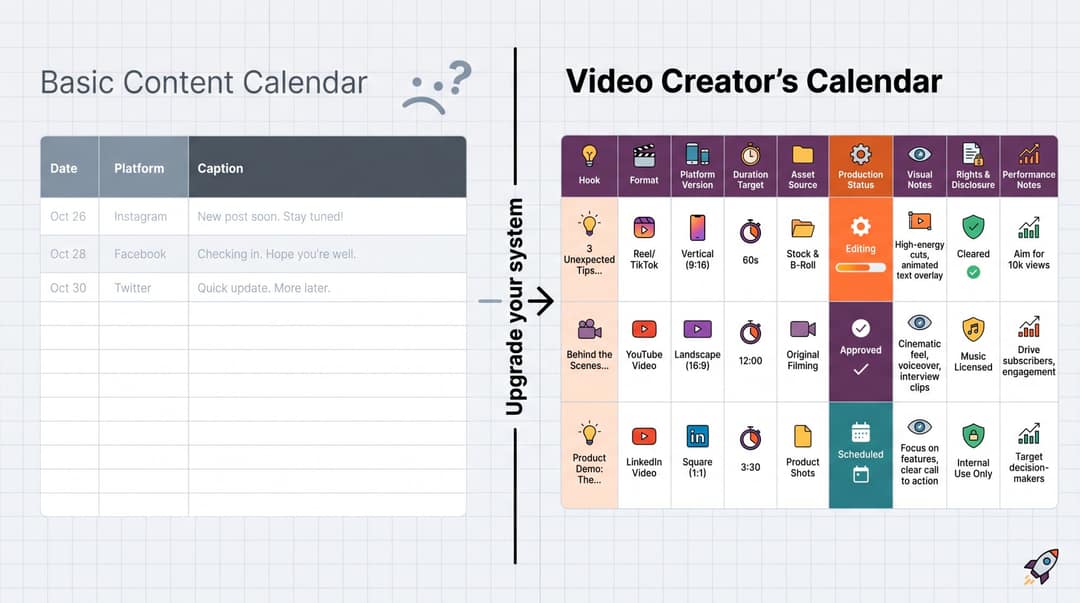
A video content calendar is a planning system that organizes upcoming videos by date, platform, topic, format, goal, production status, owner, assets and performance. Standard social media calendars stop at platform, caption, asset, date and status. That covers text posts. Video also needs these fields:
| Field | Why it matters |
|---|---|
| Hook | The first 1 to 3 seconds often decide whether people keep watching |
| Format | Talking head, faceless, tutorial, story, podcast clip, demo, quiz or visualizer: each is a different production job |
| Platform version | The same idea needs different captions, pacing and CTA on TikTok, Reels, Shorts and LinkedIn |
| Duration target | A 23-second Short and a 2-minute tutorial need different scripts and edits |
| Asset source | Long video, blog post, podcast, PDF, LinkedIn post, Reddit thread, product page or original script |
| Production status | Idea, briefed, scripted, generated or filmed, edited, approved, scheduled, published, repurposed |
| Visual notes | B-roll, screenshots, AI visuals, stock clips, product footage, safe-zone notes |
| Rights and disclosure | Music, stock and likeness rights, AI disclosure, sponsor or brand approval |
| Performance notes | Retention, watch time, engaged views, saves, shares, comments, clicks, follows, leads |
Production fields are what keep a plan alive. Content Marketing Institute's 2025 B2B content marketing research found that 45% of B2B marketers lacked a scalable content creation model, while 61% expected their organizations to increase investment in video. Without a production system, more video means a Monday plan that falls apart by Wednesday.
If you mostly post text and images, a social media content calendar is the simpler fit. Our roundup of social media calendar templates compares ready-made layouts.
Step 1: Define your video content goals
"Post more" and "grow the channel" are hopes, not goals. Use this sentence instead:
In the next 90 days, our videos will help [specific audience] achieve [specific outcome] so that we can grow [specific business or creator goal].
| Creator type | Weak goal | Better 90-day goal |
|---|---|---|
| Fitness creator | Post more Reels | Publish 5 short exercise demos per week that help busy professionals build a 20-minute home workout habit, and grow email signups |
| SaaS founder | Grow on YouTube | Turn product use cases, customer questions and founder insights into 3 Shorts and 1 long-form video per week to drive qualified demos |
| Musician | Promote the new song | Publish 30 short videos around the single: lyric clips, the story behind it, visualizers, fan prompts, behind the scenes |
| Educator | Be consistent | Run a 12-week Shorts series answering one beginner question per video, then compile the winners into longer lessons |
| Faceless channel | Go viral | Test 5 repeatable formats across history, business and mystery stories, then double down on the highest-retention series |
Every video on the calendar should serve one goal, and the goal decides the video type:
| Goal | Video types that fit |
|---|---|
| Reach | Trend adaptations, short stories, myth-busting, reactions, surprising facts |
| Trust | Tutorials, explainers, case studies, behind the scenes, founder POV |
| Leads | Problem and solution videos, checklists, lead magnet promos, comparisons |
| Sales | Product demos, UGC-style ads, objection answers, testimonials, offer explainers |
| Community | Comment replies, Q&A, challenges, duets and stitches, recurring series |
| Repurposing | Podcast clips, blog-to-video, long-form-to-Shorts, newsletter recaps |
Step 2: Choose your platforms and plan each version
Don't start with "we need to be everywhere." Start with "where does this idea naturally belong?" Then plan the platform versions it needs.
TikTok
TikTok's creative best practices recommend:
- vertical 9:16 footage
- text kept inside the UI safe zones
- the hook and main proposition in the opening seconds
- captions or text overlays
- fresh creative when performance drops
TikTok's Creative Codes add a hook, body and close structure with footage at 720p or higher. Use TikTok slots for trend adaptations, fast educational clips, personality and quick hook tests. Length is rarely the limit: TikTok's camera tools help page lists up to 10 minutes for in-app recording and 60 minutes for uploads.
Instagram Reels
In January 2025, Instagram made reels up to 3 minutes eligible for recommendation to non-followers, up from 90 seconds. You can now record and edit Reels up to 20 minutes long, but Instagram does not recommend anything over 3 minutes to people who don't follow you. Keep reach-focused Reels at 3 minutes or less. Use them for polished storytelling, demos, transformations and series that followers come back to.
YouTube Shorts
YouTube's help page on three-minute Shorts classifies square or vertical videos up to 3 minutes, uploaded on or after October 15, 2024, as Shorts. Shorts are your slot for quick, searchable answers and for sending viewers to long-form videos, so plan each Short with the long video it points to.
LinkedIn's video ad specs cover 9:16, 4:5, 16:9 and 1:1, and organic LinkedIn videos can run up to 15 minutes. Use LinkedIn for founder insights, industry commentary, case studies and webinar clips. Keep the core idea from your TikTok version, but rewrite the hook and framing to be more specific and credibility-driven.
Step 3: Build 3 to 5 content pillars
A content pillar is a repeatable category your audience expects from you, a show within your channel. With pillars, Monday planning becomes "which pillar needs a new episode?" instead of "what should I make?" Fewer than three gets repetitive. More than five gets hard to sustain.
- Business or SaaS creator: problem education, product use cases, customer proof, founder POV, community questions.
- Faceless educational channel: surprising facts, explained simply, mistakes people make, stories and case studies, quizzes.
- Musician: song story, lyric moments, performance clips, visualizers, fan participation.
Mix three types of pillar:
| Pillar type | Purpose | Example |
|---|---|---|
| Evergreen | Long-term value | How to write a better hook for Shorts |
| Timely | Current attention | What 3-minute Reels mean for creators |
| Community | Relationship | Replying to a question about posting daily |
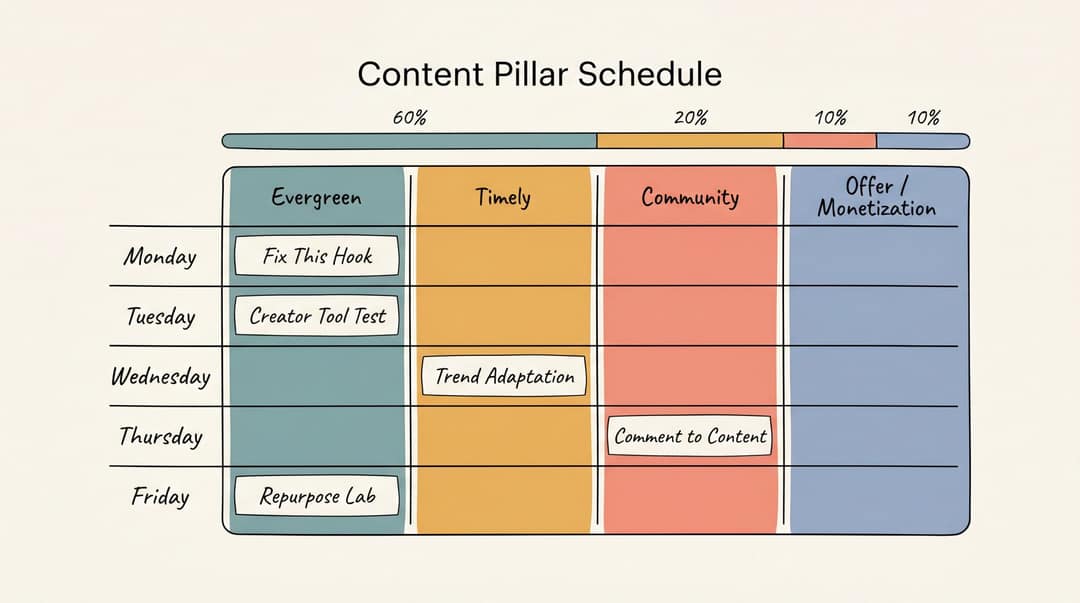
A practical default split is 60% evergreen, 20% trend or timely, 10% community response and 10% offer or monetization. Adjust it once your analytics show what earns attention.
Keep a scored idea bank
An idea dump keeps growing without telling you what to make next. An idea bank is a ranked backlog. Give each idea a row with the following fields:
- the idea and the audience pain it addresses
- pillar, format and platform
- hook
- source (comment, analytics, competitor gap, trend or keyword)
- CTA
- effort and status
Score each idea from 1 to 5 on five questions and make the highest totals first:
- Audience pain: does it solve a real problem?
- Retention potential: is there tension, curiosity, payoff or transformation?
- Production efficiency: can you make it quickly or from an existing asset?
- Strategic fit: does it support a pillar or an offer?
- Differentiation: is your angle better than the generic advice?
To fill the bank with evidence instead of guesses, search Revid's library of about 2.77 million short-form videos by topic and engagement. Then remix a proven format into an original video. Each remix becomes a row with its reference attached.
Prompt to try
Create a 40-second vertical video for a series called Fix This Hook. Open with the weak hook "Today I want to talk about content calendars" on screen, then rewrite it live into "Your calendar fails because it only tracks publish dates." Explain in two short points why the new hook works. Use bold kinetic text, quick cuts and an energetic voiceover, and end with "Drop your hook in the comments for the next episode."
Step 4: Turn pillars into recurring series
A single video can go viral, but a series builds a channel. The structure is already decided, so each episode only needs a topic.
| Series | Repeatable promise |
|---|---|
| Fix This Hook | Each episode rewrites one weak video hook |
| 1-Minute Creator Calendar | One planning tip in under a minute |
| Before You Post This | One common mistake to catch before publishing |
| Comment to Content | An audience question answered on video |
| Reddit Stories Explained | One Reddit post turned into a narrated story |
| The 30-Day Shorts Lab | Daily experiments with hooks, formats or niches |
Pick series formats with the data in mind. In Revid's TikTok study:
- challenges had the highest median views (182K, with 25.6% passing 1M)
- comedy (155K) and reactions (105K) came next
- storytelling (66K) and tutorials (62K) sat near the bottom
The sample only includes TikToks that already reached 1,000+ likes, so the figures show what top videos have in common, not what causes views. If your pillars are mostly tutorials, try packaging one series as a challenge or a reaction.
Challenges and comedy passed 1M views about twice as often as tutorials and storytelling, which are the most common formats.
Source: Revid analysis of 176,367 TikToks with 1,000+ likes posted between Oct 1, 2025 and Oct 16, 2026 (61,203 creators)
Show the data
| Median views | Share that passed 1M views | |
|---|---|---|
| Challenge | 182.3K | 25.6% |
| Comedy | 154.8K | 22.1% |
| Reaction | 104.8K | 16% |
| Dance | 83.8K | 15.5% |
| Storytelling | 66.1K | 12.2% |
| Lip Sync | 61.7K | 12.3% |
| Tutorial | 61.9K | 12.1% |
A series-based week can be as simple as this: Fix This Hook on Monday, a tool test on Tuesday, a trend adaptation on Wednesday, Comment to Content on Thursday and a repurposed clip on Friday. You plan five topics, not five new concepts.
Step 5: How often should video creators post?
Ask how many finished videos you can produce each week without lowering quality, then pick the matching row:
| Creator stage | Short-form video | Long-form video | Extras |
|---|---|---|---|
| Beginner solo creator | 3 to 5 per week | Optional, 1 to 2 per month | 2 to 5 stories or community updates per week |
| Serious solo creator | 5 to 7 per week | 1 per week or every other week | 2 to 4 repurposed clips and 2 to 3 community replies per week |
| Brand or agency | 1 to 3 per day across channels | 2 to 4 per month | 3 to 5 creative variants per paid test |
Grow the number of creative tests, not just the volume. TikTok's ad guidance recommends refreshing creative when performance declines, and the same logic holds for organic posts.
For publish times, start from your own data in TikTok Studio, Instagram Insights or YouTube Analytics. For TikTok only, Revid's study found English-language posts at 3 to 6 a.m. US Eastern outperformed the 5 to 9 p.m. window. Part of that is because those hours are daytime in the UK, Europe, India and Asia.
Step 6: Build the production workflow
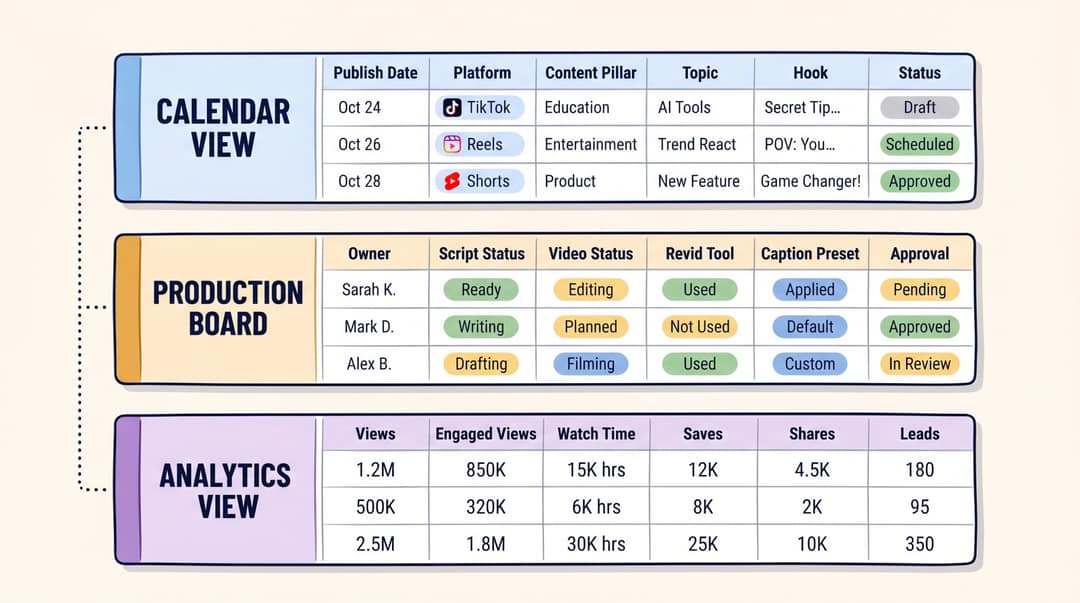
Set up three views: calendar, production and analytics
One spreadsheet can hold all three views, and so can Notion, Airtable, Asana, Trello or ClickUp. The tool matters less than the fields.
| Calendar view | Production view | Analytics view |
|---|---|---|
| Publish date and time | Owner | Published URL |
| Platform | Script status | Views and engaged views |
| Pillar and series | Video status | Average watch time and completion rate |
| Topic and goal | Asset source | Saves, shares and comments |
| Audience | Tool used and project link | Follows or subscribers gained |
| Format | Voice and visual style | Clicks and leads |
| Hook | Caption style, aspect ratio, duration | Learning (one sentence) |
| CTA and status | Rights check, AI disclosure, approval | Next action |
You won't fill every field for every video. The point is that everything important has a place to live.
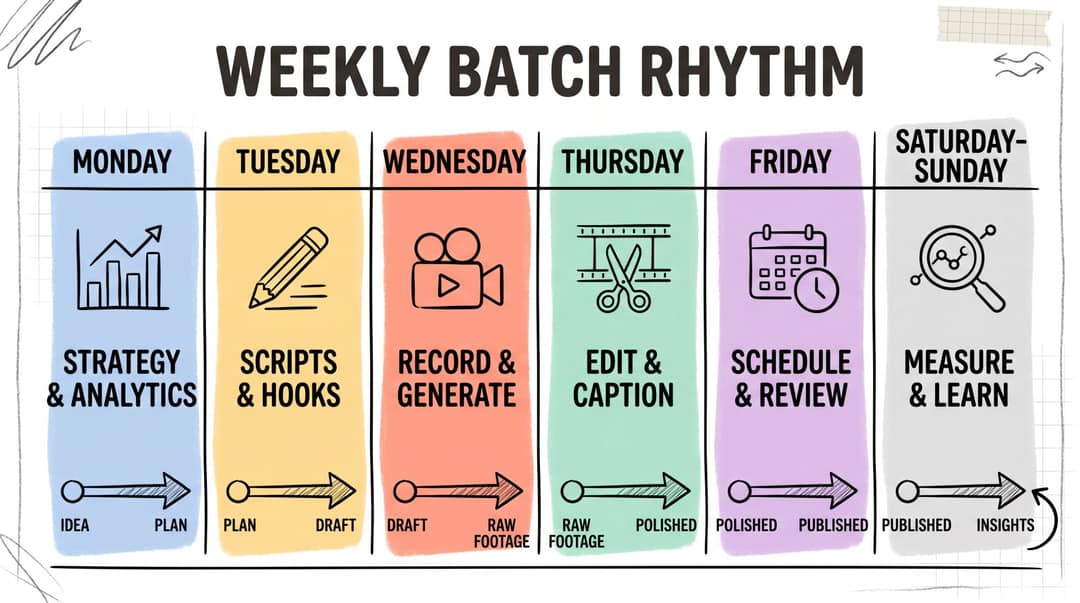
Batch production in a weekly rhythm
Batching means grouping similar tasks so you stay in one mode at a time, not filming 30 identical clips. For a TikTok-specific version, see how to batch create TikTok videos.
- Monday, strategy: review last week's analytics, pick 5 to 10 ideas from the bank, assign platform and format.
- Tuesday, scripts: write hooks first, then scripts, visual notes, CTAs and platform captions.
- Wednesday, record or generate: film talking-head clips, generate faceless videos, cut long videos into clips, record voiceovers.
- Thursday, edit: cut dead space, add captions and cover frames, export platform versions, check safe zones and aspect ratios.
- Friday, schedule: check captions, links, tags, rights and disclosure, then schedule.
- Weekend, review: log retention, saves, shares, comments and clicks, and turn winners into sequels.
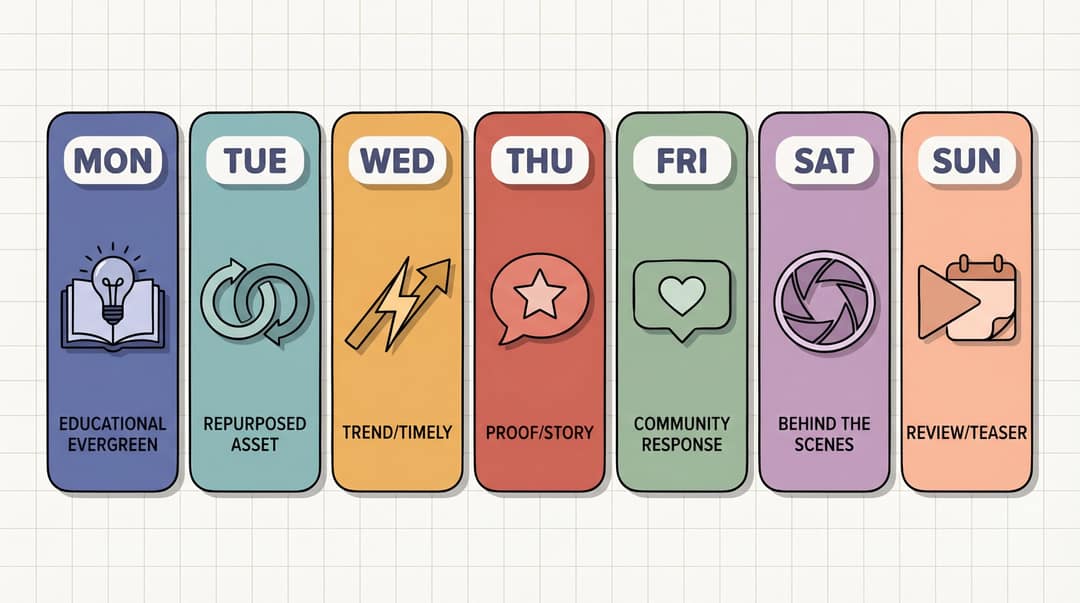
Plan the weekly content mix
A healthy calendar has variety without randomness. Here is a full seven-day mix:
| Day | Content type | Purpose | Example |
|---|---|---|---|
| Monday | Educational evergreen | Authority | How to plan a week of Shorts in 30 minutes |
| Tuesday | Repurposed asset | Efficiency | Clip from a podcast, blog, webinar or YouTube video |
| Wednesday | Trend or timely angle | Discovery | What 3-minute Reels mean for creators |
| Thursday | Proof or story | Trust | How to turn 1 article into 7 videos |
| Friday | Community response | Relationship | Reply to a comment or FAQ |
| Saturday | Behind the scenes | Personality | What my content calendar looks like |
| Sunday | Review or teaser | Retention | Next week I'm testing 5 hook styles |
For smaller cadences, compress the mix:
| Cadence | Suggested mix |
|---|---|
| 3 videos per week | 1 evergreen, 1 proof or story, 1 trend or community |
| 5 videos per week | 2 evergreen, 1 repurposed, 1 trend, 1 community |
| 7 videos per week | 3 evergreen, 1 repurposed, 1 trend, 1 proof, 1 community |
| 14+ videos per week | The same mix, with several hook and format variants |
Every week needs both growth content (trends, evergreen) and trust content (proof, community). A channel with only one of the two stalls.
Build repurposing into the calendar
Add an asset source column. It changes the question from "what new thing do I make?" to "what existing asset can become a video?"
| Source asset | Repurposed outputs |
|---|---|
| Long-form YouTube video | 5 to 15 Shorts, 3 Reels, 3 TikToks, 1 LinkedIn post, 1 newsletter |
| Podcast episode | Best quote clip, guest hot take, lesson recap, audiogram, topic explainer |
| Blog post | Summary video, listicle, myth-busting clip, FAQ Short |
| Webinar | Demo clip, objection clip, before and after clip, tutorial, highlight reel |
| Customer call | FAQ video, objection answer, testimonial, use-case explainer |
| PDF or guide | Educational series, quiz video, chapter summaries |
| Reddit thread | Story video, reaction, lesson breakdown |
How to run your video calendar with Revid
Revid turns the asset source column into finished drafts:
- Convert existing assets. Use Article to Video for blog posts and the YouTube clip maker for long videos. Audio to Video handles podcast recordings, Talking Avatar handles FAQ replies, and the AI Music Video Generator handles songs.
- Automate recurring series. An Auto-Mode worker creates a fresh video every day from a prompt or a content source. Growth ($39/month) includes 3 workers, Elite 5 and Ultra 10 (plans and credits).
- Schedule from one queue. Publish directly to TikTok, Instagram and YouTube. Every post published through Revid reports its views, likes and comments, which feeds your analytics view.
Add a Revid tool column and a project link column to the production view so any draft can be found and re-rendered. Keep a human review for facts, brand voice and AI disclosure before anything is scheduled.
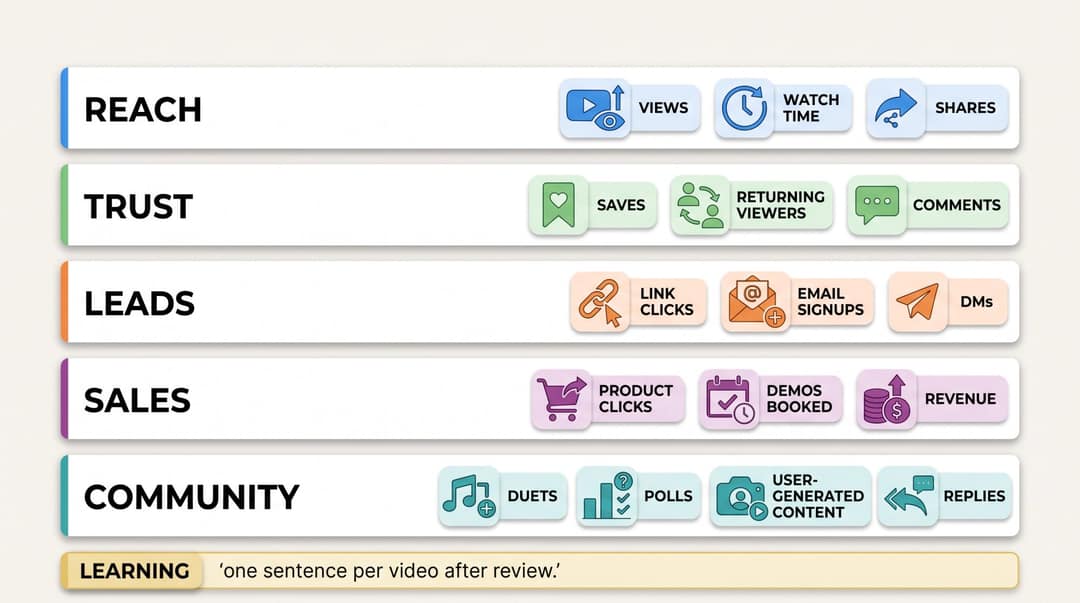
Step 7: Track the metrics that match your goal
Without an analytics view, your calendar is just a publishing log. Track the metrics tied to the goal from Step 1:
| Goal | Metrics to track |
|---|---|
| Reach | Views, engaged views, average watch time, completion rate, shares, follows gained |
| Trust | Watch time, saves, comments, profile visits, returning viewers, subscribers gained |
| Leads | Link clicks, landing page visits, email signups, comments asking for the resource, DM replies |
| Sales | Product page clicks, trial starts, demo bookings, promo code use, affiliate conversions |
| Community | Comments, replies, duets and stitches, story replies, repeat commenters |
On YouTube, a view no longer means someone watched. Since March 31, 2025, a Shorts view counts the moment a Short starts to play or replay. Since August 24, 2026, YouTube counts views at playback start on every format. Engaged views still decide YPP eligibility and earnings, so judge Shorts by engaged views, retention and subscribers gained.
Add a learning column and write one sentence per video after each review: "Strong hook, weak CTA." "High saves: make this a series." "High views, low follows: topic too broad." "Worked on TikTok, weak on LinkedIn: adapt the tone."
Turn analytics into calendar decisions
At the end of each week, sort videos into four buckets:
| Result | What it means | Calendar action |
|---|---|---|
| High reach, high retention | Strong topic and delivery | Make a sequel |
| High reach, low retention | Good hook, weak payoff | Rework the structure |
| Low reach, high conversion | Small audience, strong intent | Use it for leads and sales |
| Low reach, low conversion | Weak or wrong fit | Drop it or change the angle |
Not every low-view video failed. A video with 300 views and 40 email signups is worth more than one with 30,000 views and zero clicks.
Step 8: Run a weekly content calendar review
Answer the same ten questions every week:
- Which video had the strongest retention?
- Which video got the most shares?
- Which video got the most saves?
- Which video produced comments or DMs?
- Which video drove clicks, leads or sales?
- Which pillar performed best?
- Which format performed best?
- Which hook pattern worked?
- Which videos should get a sequel?
- Which ideas should you stop making?
YouTube Analytics audience reports show when your viewers are online, what else they watch and which formats they consume. Use TikTok Studio and Instagram Insights the same way instead of generic best-time charts. A review that doesn't change next week's calendar isn't a review.

How far ahead should you plan video content?
| Horizon | What to plan |
|---|---|
| 90 days | Goals, pillars, campaigns, launches, recurring series |
| 30 days | Weekly themes, source assets, key topics, production batches |
| 7 days | Exact scripts, hooks, edits, approvals, publish times |
| 24 to 48 hours | Trend reactions, comment replies, news |
The rule: plan strategy quarterly, topics monthly and production weekly, and leave trend slots open every day. Don't script 90 days of short-form video in advance, because audience signals move too fast.
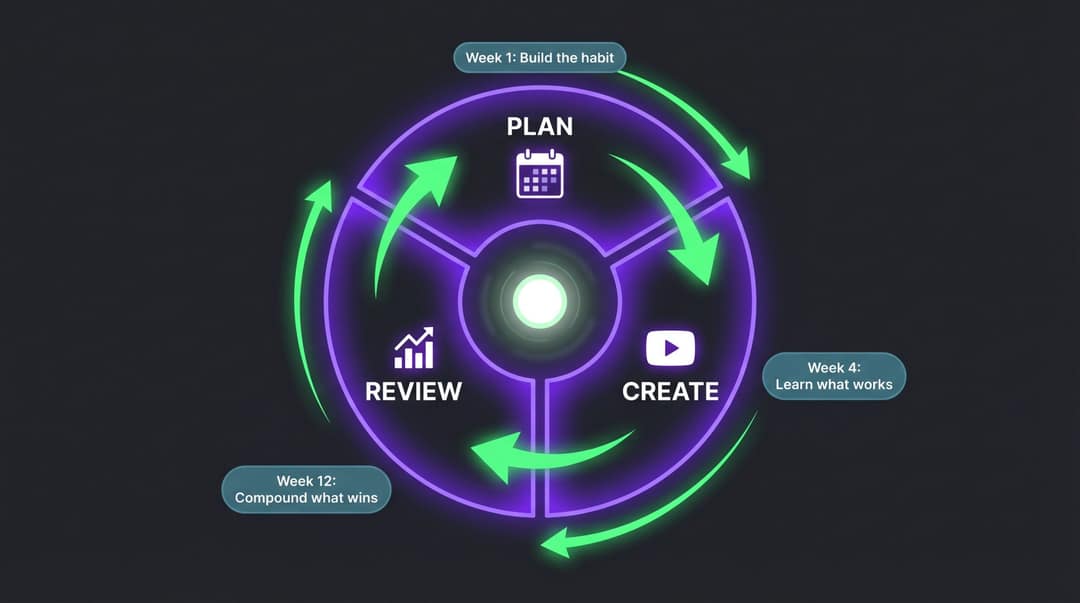
Run your first quarter as a sprint:
- Days 1 to 30, test: try 3 to 5 pillars, hook styles and formats. Publish on schedule and don't overreact to a single post.
- Days 31 to 60, double down: keep the top 2 to 3 pillars, turn winning topics into series and cut weak formats.
- Days 61 to 90, systemize: create templates for scripts, captions, covers and reviews, and build a backlog of 30 or more scored ideas.
Two ways to fill the idea bank fast
The pillar and format matrix
Put your pillars across the top and formats down the side. Every cell is a video, so 5 pillars and 6 formats give you 30 ideas in one sitting.
| Format | Workflow | Growth | Tools | Monetization |
|---|---|---|---|---|
| How-to | How to plan 5 videos | How to improve retention | How to use AI tools | How to add CTAs |
| Myth | Posting daily is required | Viral means successful | AI makes generic videos | Selling kills reach |
| Checklist | Weekly planning checklist | Pre-publish checklist | AI prompt checklist | Launch video checklist |
| Teardown | Fix a bad calendar | Analyze a viral video | Tool comparison | Offer video review |
Prompt to try
Make a 30-second vertical tutorial video with the hook "Here's the 6-stage workflow every video calendar needs." Walk through idea, script, generate, edit, schedule and review, one stage per scene, with on-screen labels and captions. Clean motion graphics style, upbeat voiceover, ending with "Save this before you plan next week."
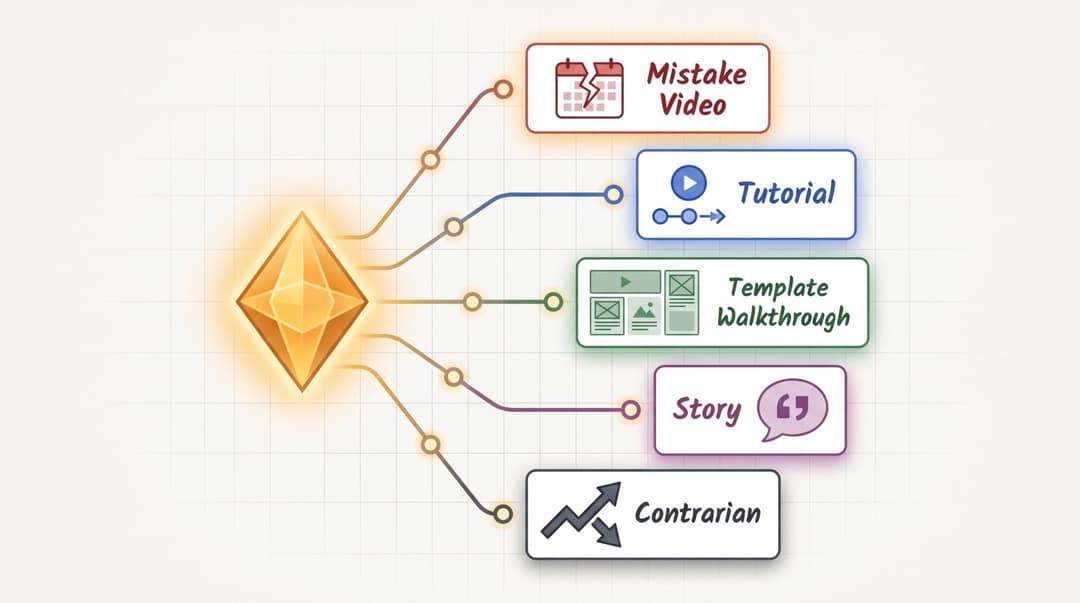
One idea, five videos
Take one idea, such as "plan videos by production stage, not just publish date", and change the angle:
| Version | Hook |
|---|---|
| Mistake | Your calendar fails because it only tracks when posts go live. |
| Tutorial | Here's the 6-stage workflow every video calendar needs. |
| Template walkthrough | Steal this production board for Shorts, Reels and TikToks. |
| Story | I stopped missing upload days when I added one column. |
| Contrarian | A content calendar is useless without a production calendar. |
Common content calendar mistakes
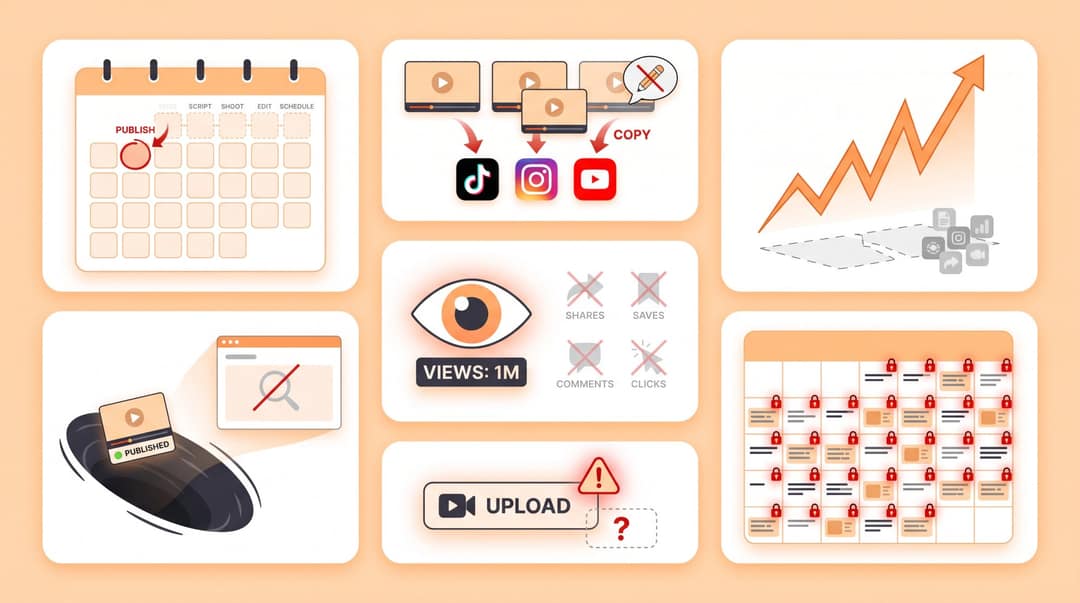
- Planning only publish dates. A calendar without production stages won't help you produce. Add a status field to every row.
- Treating every platform the same. Repurpose the core video, but change the hook, caption, CTA and sometimes the length per platform.
- Chasing trends without pillars. Trends bring spikes, while pillars build identity. Use trends to express your niche, not to escape it.
- Posting without reviewing. If learnings never change what you make next, you are only documenting effort.
- Measuring only views. Track retention, saves, shares, clicks and conversions alongside views.
- Overplanning. Locked scripts for 90 days go stale within weeks. Plan themes and series ahead, scripts weekly.
- Leaving rights and AI disclosure to the last minute. Put these checks in the workflow, not in the upload screen. The platform rules are below.
YouTube requires disclosure of realistic altered or synthetic content, such as making a real person appear to say something they didn't, or showing a realistic scene that never happened. AI-written scripts, captions and thumbnails don't need it. TikTok requires a label on AI-generated content with realistic images, audio or video. Both platforms say the label alone does not reduce a video's distribution.
Pre-publish checklist for every video
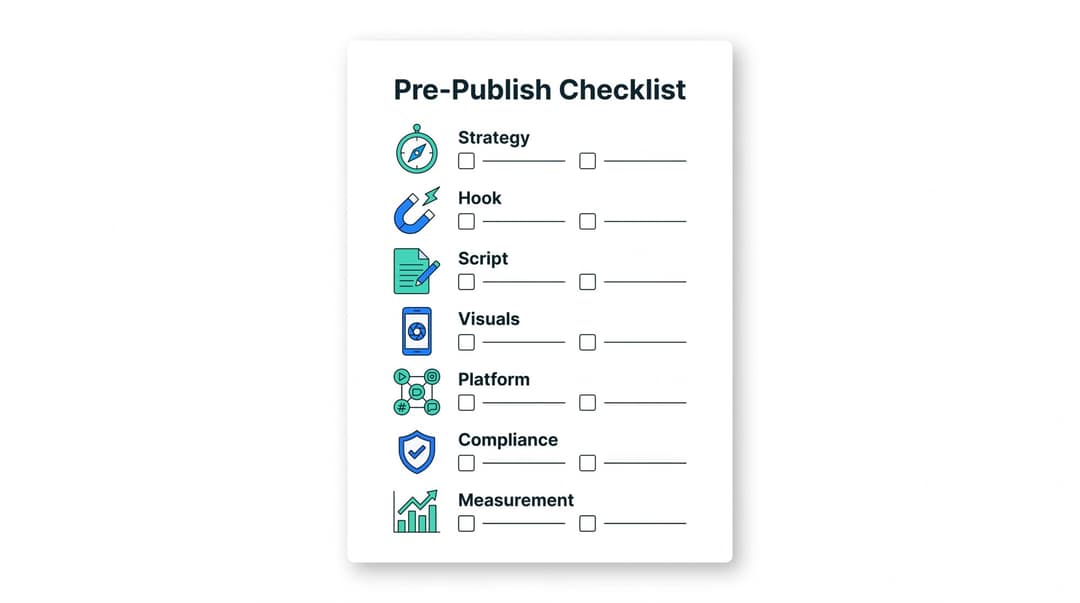
- Strategy: supports a pillar, clear audience, clear goal, fitting CTA.
- Hook: the first second creates curiosity or clarity, and the payoff is obvious.
- Script: one main idea, short sentences, a strong ending.
- Visuals: correct aspect ratio, text inside safe zones, readable captions, frequent scene changes, clear cover frame.
- Platform: platform-specific caption, relevant keywords or hashtags, the right length, allowed audio.
- Compliance: music and clips cleared, AI, likeness and sponsor disclosure handled, claims fact-checked.
- Measurement: tracking link and campaign tag ready, analytics row waiting.
Add the checklist as a status step so nothing reaches "scheduled" without passing it.
FAQ
What's the difference between a content calendar and an editorial calendar?
A content calendar schedules what goes live, where and when. An editorial calendar is broader: themes, campaigns, seasonal moments and priorities. Video creators do best with both: editorial thinking for the 90-day plan, calendar fields for weekly production.
What's the best free tool for a video content calendar?
Google Sheets is the easiest free start for a solo creator. Notion suits you if you want the idea bank, scripts and calendar linked in one place, and Trello or Asana work well for tracking production stages with a team. The best tool is the one you will actually update every week.
Should I post the same video on TikTok, Reels and Shorts?
Yes, you can share the core video, but adapt the hook text, caption, CTA, cover frame and sometimes the length for each platform. Keep Reels at 3 minutes or less to reach non-followers, and Shorts at 3 minutes or less so YouTube classifies them as Shorts.
How many ideas should be in my idea bank?
Aim for 30 or more scored ideas, so a slow week never leaves you without a topic. The pillar and format matrix fills most of that list in one sitting.
How do I know if my content calendar is working?
Check three things in order:
- You publish on your planned cadence without burning out.
- Production gets faster as you batch.
- The learning column changes what you make next.
If the same lesson appears week after week, the calendar is catching a problem that the review isn't acting on.


